Key takeaways
- Compare four 4-bay DAS enclosures for workstation backups, from hardware RAID-free 10Gbps USB-C docks to eSATA boxes, and pick the right bay layout.
A workstation backup fails in a quiet way long before it fails loudly. The internal drives fill, the single external drive becomes the only copy of client work, and swapping small drives in and out turns a simple nightly backup into a chore that gets skipped. A 4-bay direct-attached enclosure changes that routine by putting several drives behind one cable, so current projects, a mirrored copy, and older archives can stay connected to the same machine at the same time.


This guide is for workstation owners, photographers, video editors, and small-studio users who want local backup capacity without running a network server. Every pick is a true 4-bay DAS unit that connects directly by USB or eSATA, chosen from its Amazon title and specifications. There are no network-attached models here, and every enclosure is sold without drives, so the bays, interface, and drive handling matter more than any headline capacity figure.
Quick Picks
As an Amazon Associate we earn from qualifying purchases
| Product | Best for | Key spec from title |
|---|---|---|
| TERRAMASTER D4-320 | Simple 10Gbps USB-C backups | 4bay USB 3.2 Gen2 10Gbps Type-C, hot swappable, diskless |
| SABRENT DS-SC4B Docking Station | Swapping 3.5-inch drives often | USB 3.2 Gen 2, 10Gbps USB-C, tray-less hot-swap, no RAID |
| Mediasonic PROBOX HF2-SU3S3 | USB 3.0 or eSATA workstations | 4 Bay DAS, USB 3.0 and eSATA, for 3.5-inch SATA drives |
| Yottamaster PS400U3 | Aluminum USB 3.0 bulk storage | Aluminum USB3.0, for 3.5 and 2.5 inch SATA HDD/SSD, non-RAID |
How to Choose
Decide how the four bays will be used
Start by assigning a job to each bay before you look at interfaces. A practical workstation layout might use one drive for the nightly backup of the boot and project drives, a second drive as a rotating copy that is swapped weekly, a third for finished project archives, and a fourth left free for restoring or cloning a drive in an emergency. If all four bays will hold unrelated single drives, a non-RAID enclosure such as the TERRAMASTER, SABRENT, or Yottamaster models in this guide fits naturally. If you expected the box itself to mirror drives automatically, check that expectation carefully, because three of these four picks explicitly offer no RAID and rely on your backup software or operating system instead.
Match the interface to the workstation port
The interface decides both speed and convenience. USB 3.2 Gen 2 at 10Gbps, as listed for the TERRAMASTER D4-320 and the SABRENT DS-SC4B, is the better match for a modern workstation with a fast USB-C port, especially when backups run while you keep working. Older machines may be better served by the Mediasonic PROBOX, which lists both USB 3.0 and eSATA, or the Yottamaster PS400U3 with USB 3.0. Remember that four drives share the one host connection, so a backup, a restore, and a large file copy running together will divide that link rather than each receiving the full rated speed.
Check drive size, trays, and swapping style
Confirm which physical drives each enclosure accepts before reusing drives you already own. The SABRENT dock is listed for 3.5-inch HDD/SSD drives and uses a tray-less design, which suits bare drives pulled from retired workstations. The Yottamaster lists both 3.5 and 2.5 inch SATA HDD/SSD support, making it more flexible for a drawer of mixed laptop and desktop drives. The Mediasonic is a 3.5-inch SATA enclosure, while the TERRAMASTER title stresses hot swappable, plug and play operation. Tray-less bays are fast for rotation, while tray-based bays can feel tidier for drives that stay installed for months.
Plan cooling, power, and backup software
Four spinning drives in one small box generate heat and need their own mains power, so place the enclosure where air can move and where its power supply will not be switched off by accident. The SABRENT listing calls out an aluminum enclosure with a cooling fan and individual power switches, details that help when only one bay needs to be powered for a restore. Finally, remember that the enclosure is only hardware. Your workstation backup software decides scheduling, versioning, and verification, so pair any of these boxes with a routine that keeps at least one copy separate from the workstation between backup runs.
The 4 Best Options
TERRAMASTER D4-320 External Hard Drive Enclosure
The TERRAMASTER D4-320 is the cleanest starting point for a workstation that has a modern USB-C port and needs four always-connected backup drives without network complexity. Its listing presents it as a 4bay USB storage enclosure with hot swappable, plug and play handling, so adding or replacing a backup drive should not mean rebuilding the whole setup. Because it is diskless and presents individual drives to the host, it suits backup software that already manages schedules and copies. It fits editors and designers who want current work, a second copy, and archive drives visible to one workstation at once.
Specs
- Model: D4-320
- Bays: 4bay
- Interface: USB 3.2 Gen2 10Gbps Type-C USB
- Drive handling: Hot swappable, plug and play
- Configuration: Diskless, drives not included
Best for: Workstation owners who want a simple 10Gbps USB-C box for four separate backup and archive drives.
Watch out for: It is sold diskless, so you must supply your own drives, and it offers no built-in protection if a single backup drive fails.
SABRENT 4-Bay USB 3.2 Gen 2 SATA Docking Station (DS-SC4B)
The SABRENT DS-SC4B suits a workstation desk where drives rotate frequently, for example weekly backup drives, client archive drives, and a spare drive kept ready for restores. Its tray-less hot-swap design removes the fiddly step of fitting a tray before each swap, and individual power switches let one bay stay off while another runs. The aluminum enclosure and cooling fan in its title speak to long backup windows with several 3.5-inch drives active together. With no RAID, each drive remains individually recognised, which keeps recovery simple when a drive is moved to another machine.
Specs
- Model: DS-SC4B
- Bays: 4-Bay, for 3.5-inch HDD/SSD
- Interface: USB 3.2 Gen 2 SATA, 10Gbps USB-C DAS
- Drive handling: Tray-less hot-swap
- Build: Aluminum enclosure with cooling fan
- Controls: Individual power switches
- RAID: No RAID
Best for: Users who swap bare 3.5-inch backup drives often and want per-bay power control.
Watch out for: It is an enclosure for drives you supply separately, and with no RAID the mirroring must come from your backup software.
Mediasonic PROBOX 4 Bay DAS Enclosure (HF2-SU3S3)
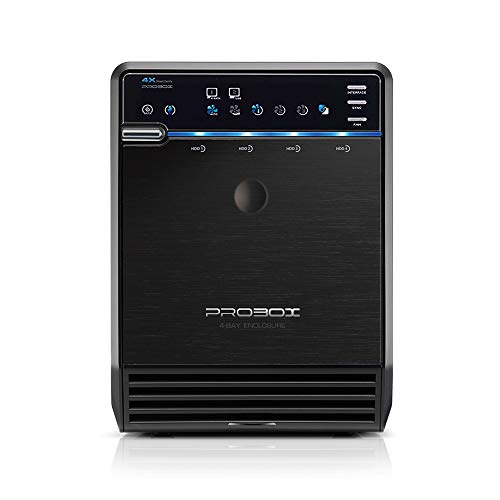
The Mediasonic PROBOX HF2-SU3S3 is the pick for an older or more varied workstation setup, because its Amazon listing gives it both USB 3.0 and eSATA rather than USB-C alone. That makes it useful where a workstation, a backup PC, and an older editing machine all need occasional access to the same set of 3.5-inch SATA drives. Its listing supports four drives and a large total capacity, so it works as a single home for nightly backups plus longer-term project archives. It is a straightforward DAS box, connecting directly to one computer at a time rather than sharing drives across a network.
Specs
- Model: HF2-SU3S3
- Bays: 4 Bay, supported devices quantity 4
- Interface: USB 3.0, eSATA
- Drives: 3.5-inch SATA hard drives
- Data transfer rate: 6 Gigabits per second, as listed
- Memory storage capacity: 72 TB, as listed
- Compatible devices: Desktop, laptop
- Hardware platform: Windows, Mac, as listed
- Item weight: 4 pounds, as listed
Best for: Workstations that still use eSATA, or mixed old and new machines that need USB 3.0 and eSATA in one box.
Watch out for: Drives are not included with the enclosure, and only one host interface should be used at a time, so plan which connection each machine will use.
Yottamaster 4 Bay External Hard Drive Enclosure (PS400U3)

The Yottamaster PS400U3 is a bulk-storage option for a workstation surrounded by spare SATA drives of different sizes. Its title lists support for both 3.5 and 2.5 inch SATA HDD/SSD drives, which makes it easier to reuse an older laptop SSD as a scratch or transfer drive alongside larger desktop backup drives. The aluminum body in its title suits a box that stays on the desk permanently, and its non-RAID, direct-attached design keeps each drive separate for backup software to manage. It fits home-studio users who value drive flexibility over the fastest USB-C connection.
Specs
- Model: PS400U3
- Bays: 4 Bay
- Interface: USB3.0
- Drives: 3.5 and 2.5 inch SATA HDD/SSD
- Capacity support: 72TB (4x18TB), as listed in the title
- Design: Aluminum external hard drive enclosure
- Configuration: Direct Attached Storage DAS, Non-RAID
Best for: Users reusing mixed 2.5-inch and 3.5-inch SATA drives for workstation backup and archive storage.
Watch out for: It is sold as an enclosure without the drives themselves, and its USB 3.0 connection is the older interface in this group, so large multi-drive backups will take longer.
Which One Fits Your Situation
You back up one modern workstation every night
Choose the TERRAMASTER D4-320 if your workstation has a fast USB-C port and the backup routine is a scheduled nightly job to drives that mostly stay in place. Its 10Gbps Type-C connection and hot swappable bays keep that routine simple, and separate drives let your backup software keep a current copy, a previous copy, and archives side by side without any network setup getting in the way.
You rotate drives for clients or weekly off-site copies
The SABRENT DS-SC4B fits a rotation habit best. Tray-less bays and individual power switches make it quick to power down one backup drive, swap in the next one, and leave the others untouched. That matters when a drive leaves the studio in a case each week, because the enclosure supports the physical routine as well as the data transfer itself, and a removed drive can still be read on its own later.
Your workstation is older, or a second machine shares the backups
Pick the Mediasonic PROBOX HF2-SU3S3 when eSATA is still in use or when the backup box moves between machines with different ports. USB 3.0 covers most computers, while eSATA gives an older workstation a direct connection without adapters. It is also a sensible choice when four large 3.5-inch drives will stay installed as a semi-permanent backup and archive set rather than rotating every few days.
You have spare drives in several sizes to reuse
The Yottamaster PS400U3 makes the most of an existing drive collection, because it accepts both 3.5 and 2.5 inch SATA drives. A large desktop drive can hold the main workstation backup, a smaller SSD can hold a bootable clone or fast transfer set, and remaining bays can carry project archives. Choose it when flexibility with drives you already own matters more than having the newest USB connection.
Common Mistakes
- Treating a 4-bay enclosure as a backup by itself, when it is only storage hardware and still needs scheduled, verified backup software.
- Keeping every copy in the same enclosure all the time, so one power, cable, or desk accident can affect the workstation and all its backups together.
- Assuming a non-RAID box mirrors drives automatically, when the TERRAMASTER, SABRENT, and Yottamaster picks here present drives individually.
- Forgetting that enclosures are sold diskless, then discovering on delivery day that no backup drives were ordered with the box.
- Running backups, restores, and large copies at once and blaming the drives, when all four bays share a single USB or eSATA link to the workstation.
Frequently Asked Questions
Is a DAS enclosure better than a NAS for workstation backups?
For a single workstation, a DAS enclosure is usually simpler, because it connects directly by USB or eSATA, appears as local drives, and needs no network accounts or server software. A NAS makes more sense when several machines must back up to the same place at once. If only one workstation is involved, direct attachment removes a layer of setup and keeps restores straightforward.
Does a 4-bay enclosure include the hard drives?
No, the picks in this guide are sold as enclosures without drives, described as diskless or as enclosures for drives you install. Budget and plan for the drives separately, and check each model for the drive sizes it accepts. The SABRENT is listed for 3.5-inch drives, while the Yottamaster lists both 3.5 and 2.5 inch SATA drives, for example.
Can I use RAID with these enclosures?
Most picks here are deliberately non-RAID, so each drive appears separately and any mirroring or pooling is handled by your operating system or backup software. That approach keeps a single drive readable if the enclosure fails. If you specifically need hardware RAID inside the box, none of the non-RAID models in this guide is the right choice, and you should look for a different enclosure type instead.
How should I arrange four drives for a safer backup?
Use at least two drives for two separate backup copies rather than one large single copy, keep a third for archives of finished work, and reserve the fourth for restores, clones, or a rotating copy that leaves the desk. Most importantly, remove or power down one copy between runs where the design allows it, so the workstation and every backup are not exposed to the same incident at the same time.