Key takeaways
- Find the best 5-bay DAS enclosures for video editing, with fast USB-C links, RAID modes, quiet cooling, and room for five drives in one desktop unit.
Introduction
Video editing eats storage. A single project can hold hours of camera originals, proxy files, audio, graphics, and exported masters, and that material grows with every shoot. A 5-bay DAS enclosure gives that material one home: five drive bays in a single box that plugs straight into a computer over USB-C, with no network setup and no monthly service to manage. For editors who work at one desk and want fast local access to a large media library, that simple arrangement is hard to beat.


DAS stands for direct attached storage. Unlike a network unit, a DAS enclosure connects to one host machine at a time, which keeps transfer speeds tied to the cable and the drives rather than to a home network. Five bays hit a useful middle ground for video work. Two bays fill up fast once 4K footage arrives, while eight or ten bays bring a bigger box, more noise, and more drives to buy. Five bays hold an active project library plus a working backup copy, and the enclosure still fits on a desk.
This guide looks at four 5-bay DAS enclosures that suit video editing, all sold as diskless units, so the editor chooses the drives that fit the project and the capacity target. Each pick below states its interface speed, RAID modes, and cooling, so the choice comes down to connection speed, footage protection, and working style.
How to Choose a 5-Bay DAS Enclosure for Video Editing
A 5-bay enclosure is a long-term piece of desk hardware, so a few details matter more than the rest. The first is the interface. Most 5-bay enclosures connect over USB-C, but the generation matters. USB 3.1 Gen 1 runs at 5 Gbps, which is enough for playing back compressed 4K footage from hard drives and for moving project files at a steady pace. USB 3.2 Gen 2 runs at 10 Gbps, which gives more headroom when the bays hold solid state drives or when several streams play at once.
The second detail is RAID. RAID spreads data across the five drives in different ways, and each mode trades speed against safety. RAID 0 stripes data across drives for maximum speed, but a single drive failure takes the whole array with it, so it suits scratch disks and proxy media rather than original camera files. RAID 1 mirrors data, which is safe but uses bays inefficiently at this size. RAID 5 is the common middle path for a five-bay unit: it stripes data with parity, so the array keeps working if one drive fails, and it leaves four drives worth of usable capacity. RAID 10 combines mirroring and striping for speed plus safety, but it halves the usable capacity. JBOD and single-disk modes show each drive separately, which suits editors who prefer to manage drives one at a time.
Cooling is the third detail. Five spinning hard drives in a closed box generate real heat, and heat shortens drive life. Look for a metal chassis, a rear fan, and vents that let air move across the drives. A temperature-controlled fan that speeds up as drives warm up keeps noise down during light work and ramps up during long exports. Editors who record voiceover or cut audio in the same room should pay attention to fan size: larger fans tend to run quieter than small ones at the same airflow.
Drive support is the fourth detail. Most 5-bay enclosures accept both 3.5-inch and 2.5-inch SATA drives, which covers desktop hard drives and SATA solid state drives. Check the maximum capacity per bay as well as the total: a unit that accepts 22 TB per bay holds far more than one capped at 16 TB per bay. Also check the operating systems listed, since editors on Mac and Windows should confirm both are supported before ordering.
Finally, think about the workflow the enclosure will serve. An editor who cuts directly from the enclosure needs the fastest interface and the most responsive RAID mode. An editor who cuts from a fast internal drive and uses the enclosure for media storage and backup needs capacity and RAID 5 protection more than raw speed. Matching the enclosure to the workflow matters more than chasing the largest headline number.
Top Picks
1. TerraMaster D5-300
The TerraMaster D5-300 is a 5-bay USB-C enclosure built around hardware RAID, and its listing names video editing among its intended uses. It connects over USB 3.1 Gen 1 Type-C at 5 Gbps, with transfer speeds stated up to 220 MB per second, and it supports RAID 0, RAID 1, RAID 5, RAID 10, Clone, JBOD, and single-disk modes. RAID 5 is the natural choice here: with five drives installed, it protects the library against a single drive failure while keeping most of the capacity usable, which is exactly the balance a working editor needs for camera originals.
Capacity is generous. The D5-300 accepts 3.5-inch and 2.5-inch SATA drives and holds up to 90 TB in total with 18 TB drives installed. The listing states a single volume size up to 16 TB, and it recommends NAS-rated hard drives such as WD Red and Seagate IronWolf for steady performance. Drives are not included, so the editor picks the drives and the capacity target.
The chassis is aluminum alloy with two smart fans at the rear, which keeps five spinning drives cool during long ingest and export sessions. A software utility, TerraMaster RAID Manager, handles array building and drive health checks, and the unit works with Windows, Mac, and Linux computers. For an editor who wants a proven five-bay RAID enclosure with a clear video editing use case and a sensible RAID 5 default, the D5-300 is a strong place to begin.
2. SABRENT DS-SC5B
The SABRENT DS-SC5B takes a different approach: it skips RAID entirely and puts all of its effort into speed and simple access. It connects over USB 3.2 Gen 2 Type-C at up to 10 Gbps, twice the link speed of the 5 Gbps units in this guide, and its listing describes that speed as suited to 4K and 8K video editing, large media libraries, and archiving. Each of the five bays holds a 3.5-inch SATA hard drive or solid state drive at SATA 6 Gbps, and each bay appears on the computer as its own drive.
That tray-less, no-RAID design has real advantages for editing. There is no array to build and no rebuild to wait through, and a drive can be pulled out and swapped without touching the other four. Each bay has its own power switch, so an editor can spin down drives that hold finished projects while keeping the active project drive running. The aluminum enclosure carries a 120 mm cooling fan, larger than the fans on most rivals, which helps keep noise low while moving air across five drives.
The DS-SC5B suits editors who manage drives individually, who keep one drive per project or per client, or who already protect footage with a separate backup routine and want the fastest possible link to each drive. It also suits editors who fill the bays with SATA solid state drives, since the 10 Gbps link gives those drives room to run. Cables for USB-C and USB-A are included, so it connects to newer and older machines alike.
3. Yottamaster PS500RC3

The Yottamaster PS500RC3 is the capacity leader in this group. It holds five 2.5-inch or 3.5-inch SATA hard drives or solid state drives, with up to 22 TB per drive and up to 110 TB in total, the largest stated capacity of the four picks here. For an editor building a deep archive of finished projects, stock footage, and camera originals, that headroom means fewer decisions about what to delete and fewer drives to juggle.
The RAID options are broad: RAID 0, RAID 1, RAID 3, RAID 5, RAID 10, JBOD, and Clone. RAID 3 is unusual at this size and can suit sequential video workloads, while RAID 5 remains the practical default for a balance of speed and protection. The enclosure connects over USB 3.1 Type-C at up to 5 Gbps, so its strength is capacity and flexibility rather than link speed. Editors who cut from proxies or from a fast internal drive and use the enclosure as a media library will feel that trade less than editors who play back many high-bitrate streams straight from the unit.
Build quality follows the same pattern as the other picks: an aluminum shell, removable drive trays, and a temperature-controlled 80 mm fan that adjusts cooling as drive heat changes. The trays make it easy to label drives by project and pull a finished project off the desk. For editors whose main problem is volume, meaning years of footage that must stay close at hand, the PS500RC3 holds more than any other five-bay unit in this guide.
4. TerraMaster D5-300C
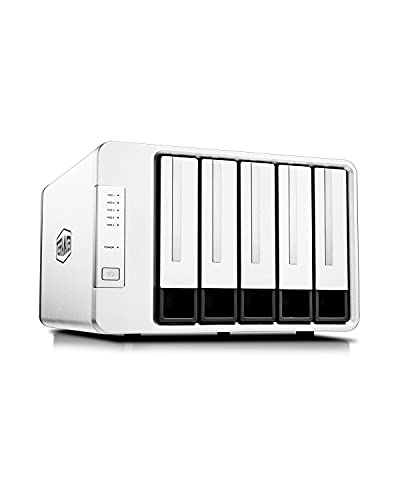
The TerraMaster D5-300C is the second TerraMaster in this guide, and it serves a different kind of editor than its sibling. Where the D5-300 spreads RAID across all five bays, the D5-300C uses an exclusive 2-plus-3 RAID mode: the first two bays can run RAID 0, RAID 1, or single-disk mode, while the remaining three bays work as separate independent drives. That split suits an editor who wants a fast mirrored or striped pair for active projects plus three plain bays for storage, backup, and archive, all in one box.
It connects over USB 3.1 Gen 1 Type-C at 5 Gbps, with sequential read speed stated up to 420 MB per second, and it holds up to 100 TB in total across its five bays. The listing is clear that the D5-300C is a DAS unit and not a network unit: it attaches to one computer, with no network setup involved. It accepts 3.5-inch and 2.5-inch drives, ships diskless, and works with Mac and Windows computers.
The D5-300C suits editors who like to keep active work and finished work physically separate without buying two enclosures. The fast pair can hold the current edit and its proxies, while the independent bays hold the camera originals, the exports, and the backup copies. For a one-person editing setup where simplicity matters as much as speed, that split-bay layout is a practical answer.
Comparison Table
| Product | Key Feature | Best For |
|---|---|---|
| TerraMaster D5-300 | USB-C 5 Gbps, RAID 0/1/5/10, up to 90 TB | RAID 5 protection for camera originals |
| SABRENT DS-SC5B | USB-C 10 Gbps, tray-less bays, no RAID | Fastest link and one drive per project |
| Yottamaster PS500RC3 | Up to 110 TB, RAID 0/1/3/5/10, 80 mm fan | Largest archive of finished projects |
| TerraMaster D5-300C | 2-plus-3 RAID mode, up to 100 TB | Active pair plus separate storage bays |
Buying Guide
Start with the footage. Editors who work with compressed 4K from mirrorless cameras can cut happily from a 5 Gbps enclosure, while editors who work with high-bitrate cinema cameras, multi-camera timelines, or 8K material should aim for the 10 Gbps link on the SABRENT DS-SC5B or plan to cut from proxies. The interface is the ceiling on every transfer the enclosure makes, so it is worth matching to the heaviest timeline the editor expects to open.
Next, choose the RAID mode before choosing the enclosure, because not every unit supports every mode. RAID 5 is the default recommendation for a five-bay video unit: it survives one drive failure and keeps four drives of usable capacity. RAID 0 is faster but leaves originals unprotected, so it belongs on scratch disks and proxy drives only. RAID 10 is safer and fast, but it halves usable capacity, which gets expensive across five large drives. JBOD and single-disk modes suit editors who organize by drive rather than by array, and the SABRENT DS-SC5B is built entirely around that approach.
Then plan the drives. All four enclosures in this guide ship diskless, so the drive choice is part of the purchase. For video libraries, high-capacity hard drives give the lowest cost per terabyte and hold up well under sequential playback, which is how video editing reads data. SATA solid state drives cost more per terabyte but respond faster when scrubbing timelines and opening large projects. Whichever drives are chosen, they should be the same brand, model, and capacity within a RAID array, since mixed drives can limit the array to the smallest and slowest member.
Cooling and noise deserve a real look before ordering. Five drives generate heat, and a fan that is too loud becomes a problem in a small edit room. Larger fans move the same air at lower speeds, which is one reason the 120 mm fan on the SABRENT stands out. Place the enclosure where air can reach its vents, away from radiators and direct sun, and leave a gap behind it so warm air can escape.
Backups still matter, even with RAID. RAID protects against a drive failure, not against accidental deletion, file corruption, or a failed enclosure. A sensible routine is to keep camera originals on the enclosure in RAID 5, keep a second copy on a separate drive or unit, and keep exported masters in a third place.
Finally, check the computer side. A 10 Gbps enclosure needs a USB port that can actually deliver 10 Gbps; plugged into a slower port, it will run at the slower speed. Check the cable too: the cable in the box is the one matched to the enclosure, and swapping in an older cable can quietly cap the speed.
Frequently Asked Questions
Is a 5-bay DAS enclosure fast enough for 4K video editing?
For most 4K workflows, yes. Compressed 4K footage from mirrorless and cinema cameras plays back well over a 5 Gbps USB-C link, and the 10 Gbps link on the SABRENT DS-SC5B gives extra headroom for multi-camera timelines and high-bitrate material. Editors who cut RAW footage or many streams at once often work from proxy files, which play back smoothly from any of the enclosures in this guide.
Do these enclosures come with hard drives included?
No. All four picks in this guide are diskless, which means the enclosure ships without drives and the editor buys drives separately. That is an advantage for video work, since it lets the editor choose the capacity, the drive type, and the number of drives that fit the project.
Which RAID mode should video editors use on a 5-bay enclosure?
RAID 5 is the usual recommendation: it protects the library if one drive fails and keeps four drives of usable capacity from five installed drives. RAID 0 is faster but loses everything if one drive fails, so it suits scratch disks and proxies rather than camera originals. RAID 10 is fast and safe but halves usable capacity. Editors who prefer one drive per project can skip RAID entirely with the SABRENT DS-SC5B or use JBOD mode on the TerraMaster and Yottamaster units.
Can a DAS enclosure be shared between two computers?
A DAS enclosure attaches to one host computer at a time, so it cannot serve two machines at once the way a network unit can. It can be moved between machines by unplugging it and connecting it to the other computer, and single-disk or JBOD modes move most easily. A hardware RAID array built on one machine may need the same RAID software on the second machine, so editors who move an enclosure between a desktop and a laptop should favor simple modes.
Conclusion
A 5-bay DAS enclosure is a practical core for a video editing desk: five bays hold a working library and a safety margin, a single USB-C cable keeps the setup simple, and diskless pricing lets the editor choose the drives. The TerraMaster D5-300 is the balanced pick, with full RAID 5 support and a stated video editing use case. The SABRENT DS-SC5B is the speed pick, with a 10 Gbps link and tray-less bays for editors who manage drives one at a time. The Yottamaster PS500RC3 is the capacity pick, holding up to 110 TB for deep archives. The TerraMaster D5-300C is the flexible pick, pairing a fast two-bay array with three independent bays in one box.
Choose by workflow, not by headline numbers. Editors who need protection for camera originals should start with RAID 5. Editors who need the fastest link should start with 10 Gbps. Editors who need room for years of footage should start with the largest per-bay capacity. Any of the four enclosures here can anchor a video editing setup for years, provided the drives are chosen with care and the footage is backed up beyond the array itself.
Disclosure: As an Amazon Associate, we earn from qualifying purchases.