Key takeaways
- For a smart light strip under 100 dollars, Govee's LED Strip Light M1 is the straightforward pick for colour effects with Matter support, Philips Hue's…
For a smart light strip under 100 dollars, Govee’s LED Strip Light M1 is the straightforward pick for colour effects with Matter support, Philips Hue’s Lightstrip Plus suits buyers who want a long-established ecosystem and bright white light, and Nanoleaf’s Essentials Lightstrip suits Thread and Apple Home setups. Which one fits depends less on colour quality than on how you plan to control it, how long a run you need and whether you want different colours along the length of the strip or one colour at a time.
Our top picks



As an Amazon Associate we earn from qualifying purchases at no extra cost to you.
What separates smart light strips
- One colour or many. Basic strips show a single colour along their whole length. RGBIC strips such as Govee’s can show several colours at once, and Nanoleaf’s Dynamic Zones strip can show gradients.
- Control path. Wi-Fi strips talk straight to your router, Bluetooth strips to your phone, Zigbee strips to a bridge, and Thread strips to a border router.
- Matter. A standard that lets one strip work across several smart home platforms.
- Cuttable or not. Some can be trimmed at marked points; neon-style rope lights cannot be cut at all.
- Length and expansion. Each system has a maximum length that its power supply supports.
- Brightness. Makers state lumens for some strips and not others, so compare only like with like.
At a glance: confirmed current strips
| Model | Length and expansion | Stated specs | Control | Limits |
|---|---|---|---|---|
| Govee LED Strip Light M1 (H61E0) | 6.56 ft (2 m) base, also sold at 16.4 ft (5 m); extensions supported up to 16.4 ft per Govee’s listing | RGBIC+, 60 LEDs per metre; 24V supply; one review lists about 730 lm per metre | Wi-Fi, Bluetooth and Matter; Apple Home, Alexa, Google Assistant, SmartThings | No wattage figure found; 2.4 GHz Wi-Fi only |
| Govee Neon Rope Light 2 (H61D3, 3 m; H61D5, 5 m) | 3 m or 5 m rolls | H61D3: 24V, 36 W, 252 LEDs. H61D5: 24V and 420 LEDs; 48 W on the EU page, with 2 A on another page. 64 presets | Bluetooth and Wi-Fi, Matter, Alexa, Google Assistant | Cannot be cut; does not support 5G Wi-Fi; EU page lists it as water resistant |
| Govee RGBIC Outdoor Neon Rope Light (H61A8 / H61A9) | 32.8 ft roll; 65.6 ft kit | 24V on the short roll, 36V on the long kit; IP67; 8 mm wide; 4 cm minimum bend radius | Matter supported | Cannot be cut; premium tier |
| Philips Hue Lightstrip Plus (V4) | 2 m base, extendable up to 10 m | Up to 1,700 lm; 2000 to 6500 K; IP20 | Bluetooth or Hue Bridge; Zigbee repeater; Matter on newer listings | One colour at a time; Philips lists 20 W for the 2 m kit, though one US field shows 11.5 W; extensions need the Bluetooth version |
| Nanoleaf Essentials Lightstrip | 2 m starter, 1 m expansions, up to 10 m | 2,000 lm average, 2,200 lm max; RGBCW; 2700 to 6500 K; 23 W for 2 m; 15,000 h lifetime | Thread and Bluetooth; Apple Home, Google Home, Alexa, SmartThings | Thread border router needed for some functions; brightness falls past 10 m |
| Nanoleaf Multicolor Lightstrips with Dynamic Zones | 5 m, trimmable, not extendable | 50 zones (Standard) or 300 (HD); 550 lm; 18 W max | Smart-home platforms per maker | Lower brightness; mid-range to premium |
Colour effects: Govee
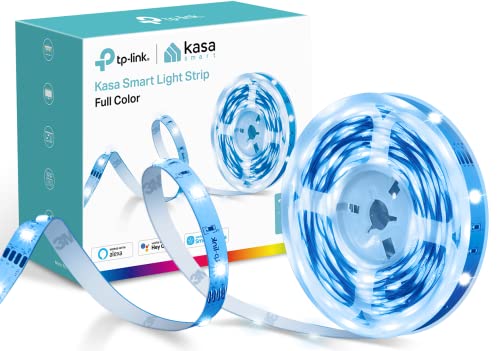
The Govee M1 is a Matter-compatible strip. It uses RGBIC+ chips with 60 LEDs per metre, so you can show different colours along its length, and it can be controlled through Matter platforms as well as Govee’s app. At 6.56 ft it is suited to a desk, a TV back or a shelf edge, and Govee’s listing gives a 16.4 ft maximum with extensions. It runs on 2.4 GHz Wi-Fi and Bluetooth and does not support 5 GHz Wi-Fi.
The Neon Rope Light 2 is a different style: a flexible, silicone-like tube that mimics neon signs and runs on 24V. It is 14 percent more flexible than the previous generation, according to Govee, and supports camera-based shape mapping in the app. Its trade-offs are that it cannot be cut and it works on 2.4 GHz Wi-Fi only. It suits signs, headboards and bend-heavy layouts, but the longer H61D5 is likely to reach beyond the cap, so compare lengths with your wall.
White light and ecosystem: Philips Hue
The Lightstrip Plus V4 is a mature product: 2 m, extendable to 10 m with 1 m extensions, up to 1,700 lumens, with a range from 2000 to 6500 K. It shows one colour at a time rather than gradients, so it is better as a bright accent or under-cabinet light than as a multicolour display. It runs on Bluetooth for basic control or on the Hue Bridge for full features, and it acts as a Zigbee repeater. Hue’s spec pages list 20 W, though one US field shows 11.5 W, so rely on the label and manual that come with the strip.
Buyers who already own a bridge find Hue’s apps and automations deep, while new buyers should factor in the extra hardware if they want the full feature set. Because the strip is rated IP20, it is for dry indoor use only.
Thread and Apple Home: Nanoleaf
The Essentials Lightstrip lists 2,000 lumens on average and 2,200 at maximum, higher than Hue’s figures, with RGBCW colour from 2700 to 6500 K. It uses Thread and Bluetooth, needs no hub, but needs a Thread border router for some functions, so confirm your existing devices can act as one. It cuts at marks every 13 inches and is rated at 15,000 hours. The Dynamic Zones strip is a different product, trading brightness for gradient effects across 50 or 300 zones.
Installation, power and safety notes
- Use the supplied power supply. Do not swap in a different adapter, and do not exceed the maximum length the maker allows.
- Do not cut strips that are not cuttable. Neon rope products are sealed, and cutting them damages the strip. Cut standard strips only at the marked points and follow the manual.
- Keep strips ventilated. Do not bundle or cover a strip while it is on, and avoid placing it where it could overheat.
- Dry indoor use. Hue’s Lightstrip Plus is IP20. Only use strips outdoors or in damp areas if the maker lists a suitable rating, such as Govee’s IP67 outdoor neon rope.
- Surface prep. Clean the surface with a dry cloth, check that adhesive tape sticks, and remove the strip gently to avoid peeling paint. Rented walls may need removable clips.
- Wiring. A strip that plugs into a socket needs no electrician. Hard-wired power supplies do, so consult a qualified electrician.
Budget, mid-range and premium
- Budget: the Govee M1 at 6.56 ft is the most likely fit for the cap, with effects and Matter at the base length.
- Mid-range: the Hue 2 m base and the Nanoleaf Essentials 2 m starter, plus a bridge or border router where needed.
- Premium: Govee’s outdoor neon rope in long rolls, and long extended runs of any system.
Totals depend on extensions and accessories, so add them up before deciding. The Nanoleaf and Govee neon-rope figures here come from single maker pages and were not cross-checked, so confirm them for the exact model.
Pick X if … decision table
| You want | Choose | Reason |
|---|---|---|
| Multicolour effects on a desk or TV | Govee M1 | RGBIC+ and Matter |
| A neon-sign look | Govee Neon Rope Light 2 | Flexible tube, camera-based shape mapping |
| Bright white accent light | Philips Hue Lightstrip Plus | Up to 1,700 lm |
| Thread and Apple Home without a hub | Nanoleaf Essentials | Thread, 2,000 lm average |
| Gradients along the length | Nanoleaf Dynamic Zones | 50 or 300 zones |
| Outdoor deck or railing | Govee RGBIC Outdoor Neon Rope | IP67 rating listed |
Alternatives
- Smart bulbs or lamps. If you only want colour in one spot, a smart bulb in an existing lamp may cost less.
- Plug-in light bars. Slim bars sit behind a TV or monitor without adhesive and are easy to move.
- Basic non-smart strips. A simple remote-controlled strip is cheaper if you don’t need automation or Matter.
Frequently Asked Questions
What does Matter add to a light strip?
Matter lets one strip work with several smart home platforms, such as Apple Home, Alexa and Google Assistant. Govee lists its M1 as Matter-compatible, and some Hue listings mention it too. Basic features like on, off, colour and brightness work through the platform, while advanced effects may still need the maker’s app.
Can I cut a smart light strip?
Some strips, such as the Nanoleaf Essentials and Hue Lightstrip Plus, are cuttable at marked points. Govee’s neon rope lights cannot be cut. Follow the manual before using scissors.
How long can I extend a strip?
Limits vary by system: the Govee M1 extends to 16.4 ft per Govee’s listing, and both Hue and Nanoleaf extend to 10 m, with Nanoleaf noting that brightness decreases past that length.
Do I need a hub?
Not always. Govee strips use Wi-Fi and Bluetooth, and Nanoleaf Essentials uses Thread and Bluetooth, although some functions need a Thread border router. Hue works over Bluetooth but needs a bridge for full features.
Can I use a strip outdoors?
Only if the maker rates it for it. Hue’s Lightstrip Plus is IP20 and for dry indoor use, while Govee lists IP67 for its outdoor neon rope.
Are smart light strips safe to leave on?
Use the supplied power supply, keep the strip uncovered and within its maximum length, and follow the manual. If a strip or adapter becomes unusually hot, switch it off and stop using it.