Key takeaways
- Compare Thunderbolt RAID enclosures for video editing, from compact 2-bay mirroring to transportable 4-bay RAID 5 for multi-stream 4K timelines.
Editing storage fails in a specific way: the timeline still opens, yet scrubbing stutters, renders queue behind copies, and one tired drive can threaten the only copy of a shoot. Choosing a Thunderbolt RAID enclosure is therefore less about a headline speed and more about matching bay count, RAID protection, and transport needs to the footage you cannot reshoot. Getting that balance wrong costs either wasted capacity or an avoidable rebuild.

This guide is for solo editors cutting client work at a desk, small teams sharing project drives between suites, and location shooters who need protected storage before they travel home. Consider also how long footage stays online and who needs access before delivery deadlines arrive. Every pick below is a multi-bay Thunderbolt RAID system, selected from its Amazon product name and listed specifications.
Quick Picks
As an Amazon Associate we earn from qualifying purchases
| Product | Best for | Key spec from title |
|---|---|---|
| OWC ThunderBay 4 24TB | Editors who want four bays and flexible software RAID | Four-Bay Thunderbolt 40Gb/s |
| SanDisk Professional 72TB G-RAID Shuttle 4 | Large projects that move between location and studio | 72TB, Thunderbolt 3 and USB-C, Hardware RAID |
| SanDisk Professional 16TB G-RAID Project 2 | Compact two-bay desks needing fast RAID 0 or mirroring | 16TB, Thunderbolt 3, Up to 480MB/s Read |
| Glyph Blackbox PRO RAID Thunderbolt 3 Desktop 32TB | Two-drive protection with a simple hardware switch | 32TB Thunderbolt 3 Desktop |
How to Choose
Decide whether you need mirroring, parity, or pure speed
RAID 0 spreads data for speed but leaves the whole volume exposed if one drive fails, which suits a scratch disk that can be rebuilt from elsewhere. RAID 1 mirrors two drives, halving usable space while keeping a copy. Larger arrays add parity options such as RAID 5 or RAID 10, balancing capacity, speed, and survival through a single drive failure. For irreplaceable camera originals, protection should win over the fastest benchmark. For renders and proxies you can recreate overnight, speed may reasonably come first, provided the masters live somewhere separate.
Count bays against the projects you actually keep live
Two bays are tidy and simple, yet they lock you into mirroring or striping and fill quickly once several 4K projects overlap. Four bays open up parity RAID, larger volumes, and room to keep current work, recent deliverables, and an archive together without constant offloading. Think in finished projects, not drive sizes: how many shoots stay online before delivery, how long clients request revisions, and whether older jobs return for re-edits. Buying one bay too few often means a second enclosure, another power supply, and a messier desk within a year.
Confirm the host really has Thunderbolt, not just USB-C
A USB-C plug shape does not guarantee Thunderbolt, and several enclosures in this category will not work as intended on a USB-only port. Check the port marking and the computer specification before ordering, especially on Windows laptops where similar-looking ports differ. Also consider what else shares that connection. Dual Thunderbolt ports and daisy-chaining help when a monitor, dock, or second array must sit on the same chain, while a lone port can force awkward swapping during ingest. Cable length matters too, because Thunderbolt runs are short and desks rarely cooperate.
Plan for failure, noise, and moving the array
An enclosure sitting beside a microphone or a client chair needs manageable fan noise and vibration, not just throughput. Hot-swappable or easily replaced drives shorten a bad day, but only if a compatible spare is already on the shelf and the rebuild process is understood before it happens. Transport changes the calculation again: a handle and a compact chassis matter on location, while a heavy desktop unit belongs in one suite. Finally, remember that RAID protects against a drive failure, not deletion, theft, or a flood, so a separate backup remains essential.
The 4 Best Options
OWC ThunderBay 4 24TB
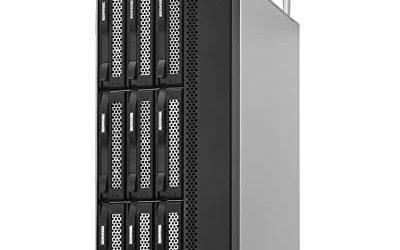
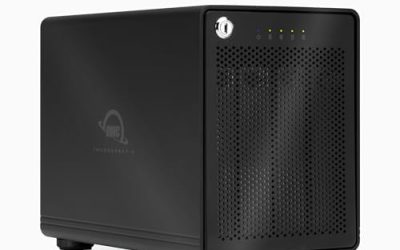
Four bays give this OWC system its appeal for editors whose project library has outgrown a mirrored pair. The listing describes a four-drive solution with dual Thunderbolt 3 ports, configurable across several RAID levels, and SoftRAID Premium for creating, monitoring, and managing arrays. That combination suits a main edit desk where one volume might favour parity protection for active projects while drive health monitoring matters day to day. It is a populated 24TB solution rather than an empty shell, so the buying decision centres on the configured capacity and the included software term.
Specs
- Capacity: 24TB
- Drive bays: 4
- Hardware interface: Thunderbolt
- Ports: Dual Thunderbolt 3 ports
- RAID levels: RAID 0, 1, 4, 5, and 1+0 (10), user configurable
- Included software: SoftRAID Premium, with a 3-year subscription included in the listing
- Platform: PC and Mac, per the listing
Best for: Editors who want a four-bay Thunderbolt array with software-led RAID management at a central desk.
Watch out for: Confirm the SoftRAID subscription term and renewal needs for your operating system before relying on it long term.
ASIN: B07VBPP1DQ
SanDisk Professional 72TB G-RAID Shuttle 4
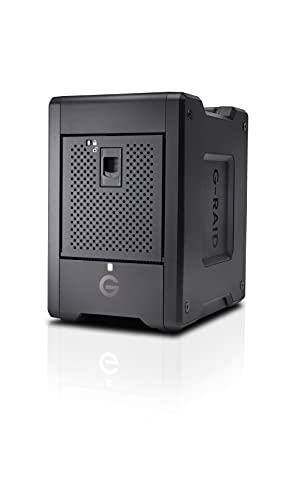
Capacity and movement define the Shuttle 4. SanDisk Professional describes it as a transportable, enterprise-class four-bay drive with hardware RAID, arriving in RAID 5 and also supporting other modes for speed or mirroring. The listing highlights multi-stream 4K, 8K, and VR workflows, plus 7200RPM Ultrastar enterprise-class drives inside. For a production that ingests on location, edits in a studio, and then carries the same volume to a client review, that combination of size, parity protection out of the box, and a transportable design is difficult to replace with a fixed desktop box.
Specs
- Capacity: 72TB for this model
- Drive bays: 4, transportable design
- Interfaces: Thunderbolt 3 (40Gbps) and USB-C (10Gbps)
- Hardware RAID: RAID 5 out of the box; supports RAID 0, 1, 5, 10, or JBOD
- Drives inside: 7200RPM Ultrastar enterprise-class hard drives
- Dual Thunderbolt 3 ports, with daisy-chaining for up to 5 additional devices
- Compatibility: Ready to go with Mac (HFS+); works with Windows via reformat
- Warranty: 5-year limited warranty
Best for: Teams moving very large projects between location and studio who want RAID 5 already configured.
Watch out for: Windows users should plan the reformat before the first ingest, since the drive arrives ready for Mac.
ASIN: B097C7L5QF
SanDisk Professional 16TB G-RAID Project 2

Not every edit desk needs four bays. This two-bay SanDisk Professional system keeps the footprint smaller while still offering Thunderbolt 3, hardware RAID choices, and enterprise-class drives. The listing says it ships in RAID 0 for improved performance and can be set to RAID 1 or JBOD, so the same enclosure can start as a fast working volume and later become a mirrored home for finished projects. That flexibility helps freelancers whose single workstation handles ingest, editing, and delivery, and who would rather reconfigure a compact array than add a second large enclosure beside the monitor.
Specs
- Capacity: 16TB for this model
- Drive bays: 2, enterprise-class storage system
- Drives inside: Two 7200RPM Ultrastar hard drives
- Interface: Thunderbolt 3 (40Gbps) and USB 3.2 Gen 2×1 (10Gbps)
- RAID support: RAID 0 (default), RAID 1, and JBOD
- Read speed in title: Up to 480MB/s read
- Daisy-chaining: Up to five additional devices via the Thunderbolt 3 interface
Best for: Solo editors with limited desk space who want to switch between RAID 0 speed and RAID 1 mirroring.
Watch out for: In RAID 1 the usable capacity is half the headline total, so size the model for mirrored use if protection is the plan.
ASIN: B0DMBNTJF2
Glyph Blackbox PRO RAID Thunderbolt 3 Desktop 32TB

Glyph takes a more direct approach: two drives, a hardware selector, and a choice between striping for performance or mirroring for protection. The Amazon listing describes 32TB of RAID-enabled Thunderbolt 3 storage built from dual 16TB drives, aimed at filmmakers, VFX artists, and media professionals working in demanding environments. There is no sprawling mode list to learn, which can be a virtue in a small studio where several people use the same desk. You pick the behaviour you need, set it, and the enclosure stays focused on being a fast, protected working drive.
Specs
- Capacity: 32TB
- Drives: Dual 16TB drives
- Interface: Thunderbolt 3 and USB-C 3.2 Gen 2 ports, per the listing
- RAID: Switch RAID 0 for performance or RAID 1 for data protection, configured via a built-in hardware selector
- Intended use in listing: Filmmakers, VFX artists, and media professionals
Best for: Editors who prefer a simple hardware RAID 0 or RAID 1 choice without managing a larger array.
Watch out for: With only RAID 0 and RAID 1 on offer, there is no parity option if you later want the balance that four bays provide.
ASIN: B0BZ8XTB95
Which One Fits Your Situation
You edit alone and clients return months later for revisions
Choose the OWC ThunderBay 4 24TB. Four bays and parity-capable RAID levels let active projects and recently delivered work stay online together, while drive monitoring helps you spot trouble before a revision deadline. The G-RAID Project 2 also works here if desk space is tight, though its two bays will fill sooner once several client archives accumulate alongside current timelines.
You shoot on location and the drive travels with the footage
Pick the SanDisk Professional 72TB G-RAID Shuttle 4. Its transportable four-bay design, large capacity, and RAID 5 configuration out of the box address the riskiest part of a production: the journey between set and studio with the only project copy on board. Keep a separate backup once you arrive, because transport protection and drive redundancy solve different problems.
Your desk is small and the array is mainly a fast working volume
The SanDisk Professional 16TB G-RAID Project 2 fits this pattern well. Two bays keep the unit compact, Thunderbolt 3 keeps it responsive for editing, and the option to move from RAID 0 to RAID 1 means the same box can become a mirrored delivery drive later. Editors who know they will outgrow two bays within a year should skip straight to a four-bay model instead.
Several people share one edit station and nobody wants RAID software duties
Consider the Glyph Blackbox PRO RAID 32TB. A hardware selector for RAID 0 or RAID 1 keeps the decision visible and simple for whoever sits down at the desk. It will not match a four-bay array for expansion or parity choices, yet for a shared workstation holding a defined set of current projects, simplicity can prevent configuration mistakes.
Common Mistakes
- Treating RAID as a backup, then deleting a project or losing the enclosure and discovering there was never a second copy.
- Buying a Thunderbolt enclosure for a computer that only has USB-C without Thunderbolt, based on the plug shape alone.
- Choosing RAID 0 for camera originals to chase speed, leaving the entire volume dependent on every drive surviving.
- Comparing headline capacity without subtracting mirroring or parity, then finding the usable volume too small for the project.
- Waiting until a drive fails to buy a spare or learn the rebuild steps, turning a manageable swap into days of downtime.
Frequently Asked Questions
Is RAID 5 or RAID 1 better for video editing?
RAID 1 mirrors two drives and is simple, but it gives up half the capacity. RAID 5 on three or more drives uses parity, preserving more usable space while still surviving one drive failure. For a two-bay enclosure, mirroring is usually the practical protected choice. For four bays holding large projects, RAID 5 often balances space and safety better.
Can I plug a Thunderbolt RAID enclosure into any USB-C port?
No. The connector shape matches, yet the port itself must support Thunderbolt. A USB-C port without Thunderbolt may not connect to these enclosures at all, or may fall back only where the listing explicitly supports a USB mode. Check the computer specification and the symbol beside the port, and test the exact machine before a location shoot depends on it.
Should an editing array be populated or an empty enclosure?
A populated system arrives with drives installed and, in some cases, a RAID mode already set, which shortens setup and keeps drive selection with the manufacturer. An empty enclosure lets you choose drives and reuse spares you already own. Either route can work; the deciding factors are whether you need to start immediately and whether you are comfortable installing and configuring drives yourself.
How fast does storage need to be for multi-stream 4K editing?
It depends on codec, stream count, and effects, not resolution alone. Lightly compressed 4K with several streams asks far more of an array than a single stream of a highly compressed format. Match the enclosure and RAID level to your actual codec, keep headroom for renders and exports running alongside playback, and avoid judging the purchase by interface speed alone, since drives and RAID mode set the real ceiling.