Our Short List of 3

- Best for: Editors building a RAID 5 project volume from drives they choose themselves.
- 4 bays for 3.5-inch / 2.5-inch SATA HDDs and SSDs, hot-swappable
- Hardware RAID supporting Individual, JBOD, RAID 0, 1, 5, and 10
- USB 3.2 Gen 1 Type-C host connection
- RAID set by rear DIP switch or QNAP External RAID Manager software
- Best for: Post houses and DIT workflows that need a large, protected, moveable project volume.
- 72TB capacity from four removable Ultrastar enterprise-class 7200 RPM drives
- Built-in hardware RAID, preconfigured RAID 5; supports RAID 0, 1, 10, and JBOD
- Thunderbolt 3 and USB-C (10Gbps) interfaces
- Transfer rates up to 1000MB/s read and 1100MB/s write
- Best for: Solo editors and small studios wanting a ready-made mirrored or striped desktop volume.
- 16TB capacity from two 7200 RPM enterprise-class drives
- Hardware RAID 0 / 1, set on the enclosure
- USB-C connection with transfer speeds up to 440MB/s
- Hot-swappable drive trays
All 4 Picks at a Glance
| Product | Specs | Action |
|---|---|---|
| QNAP TR-004 |
| Check price on Amazon |
| SanDisk Professional G-RAID Shuttle 4 72TB |
| Check price on Amazon |
| LaCie 2big RAID 16TB |
| Check price on Amazon |
 Oyen Digital Mobius 2C RAID |
| Check price on Amazon |
Key takeaways
- Compare the best hardware RAID enclosures for video editing: onboard controllers, RAID 5, and USB-C or Thunderbolt picks for fast, protected footage.
Editing video from the same drive that holds your only copy of the footage is a gamble, and editing from a plain single external drive is a bottleneck. The real decision is how your footage volume behaves when a drive fails mid-project and how fast it can feed multicam timelines: a hardware RAID enclosure puts a dedicated controller in the box, so the array keeps its speed and rebuild logic regardless of which computer you plug it into.
This roundup is for editors, colorists, and small post teams who want direct-attached storage that protects footage without a NAS or a software RAID setup. Every pick below is a multi-bay desktop enclosure whose Amazon listing states hardware RAID, and the specs quoted come from those product listings.
Quick Picks
As an Amazon Associate we earn from qualifying purchases
| Product | Best for | Key spec from title |
|---|---|---|
| QNAP TR-004 | Editors who want RAID 5 on their own drives | 4 Bay USB Type-C DAS with hardware RAID (Diskless) |
| SanDisk Professional G-RAID Shuttle 4 72TB | High-end suites moving big projects between rooms | 4-Bay, Thunderbolt 3 and USB-C, Hardware RAID |
| LaCie 2big RAID 16TB | Solo editors who want a ready-to-run mirrored or striped volume | 16TB, USB-C, 7200 RPM Enterprise Class Drives |
| Oyen Digital Mobius 2C RAID | Compact desks needing a simple two-bay hardware RAID box | 2-Bay USB-C RAID Hard Drive Enclosure |
| QNAP TR-002 | Laptop editors adding a small mirrored scratch volume | 2 Bay USB Type-C DAS with Hardware RAID (Diskless) |
How to Choose
Confirm the RAID is handled by an onboard controller
Hardware RAID means a chip inside the enclosure builds and maintains the array, so the volume mounts the same way on any machine and rebuilds do not tax your editing CPU. Software RAID ties the array to one operating system and its utilities. Check the listing wording carefully: phrases like hardware RAID, built-in RAID controller, or onboard RAID are what you want, while enclosures that only mention JBOD or rely on an OS disk utility leave the work to your computer.
Match the RAID level to how you treat footage
RAID 0 stripes data for speed but loses everything if one drive dies, so it suits scratch and cache volumes you can recreate. RAID 1 mirrors two drives and fits irreplaceable camera originals on smaller projects. RAID 5 spreads parity across three or more drives, giving a sensible balance of capacity, speed, and single-drive fault tolerance for active project storage. RAID 10 mirrors striped pairs for faster rebuilds. Decide which failure you are protecting against before you count bays, because the level you pick on day one decides both your usable capacity and your recovery options later.
Check the host connection against your timeline demands
A USB 3.2 Gen 1 link caps real throughput well below what a four-drive stripe can deliver, while USB 3.2 Gen 2 and Thunderbolt 3 connections give striped and parity arrays room to stretch. For single-stream 4K editing, even the slower links cope; multicam 4K, high-frame-rate footage, and fast ingest from card readers reward the faster interfaces. Also confirm the port type on your workstation, because a USB-C enclosure on a USB-A-only machine means adapters and possibly reduced speed. Daisy-chaining on Thunderbolt models can also save ports on a crowded desk setup.
Decide between diskless enclosures and pre-loaded arrays
Diskless enclosures let you choose the drives, reuse spares you already own, and replace a failed unit with the exact model you prefer. Pre-loaded arrays arrive formatted and tested as a set, with matched enterprise drives and a single warranty covering the whole box. For video work, pre-loaded units reduce setup surprises, while diskless boxes reward editors who already keep matched NAS or enterprise drives on the shelf. Either way, keep drive models identical inside one array. Also think ahead about spares: buying one extra matching drive with a diskless enclosure means a failure never waits on shipping.
The 5 Best Options
QNAP TR-004
- Best for: Editors building a RAID 5 project volume from drives they choose themselves.
- 4 bays for 3.5-inch / 2.5-inch SATA HDDs and SSDs, hot-swappable
- Hardware RAID supporting Individual, JBOD, RAID 0, 1, 5, and 10
- USB 3.2 Gen 1 Type-C host connection
- RAID set by rear DIP switch or QNAP External RAID Manager software
Editors building a RAID 5 project volume from drives they choose themselves.
The USB 3.2 Gen 1 link limits striped-array speed, so it is not the fastest option here for multicam work.
The TR-004 is the flexible starting point for editors who already own drives or want to pick them deliberately. Its four bays accept 3.5-inch and 2.5-inch SATA drives, and the onboard controller offers RAID 5 for protected project storage or RAID 0 for a fast scratch volume. RAID mode is set with a physical switch on the back or through QNAP’s manager software, and the array stays readable on Windows, Mac, and Linux machines because the enclosure, not the host, owns the RAID.
SanDisk Professional G-RAID Shuttle 4 72TB
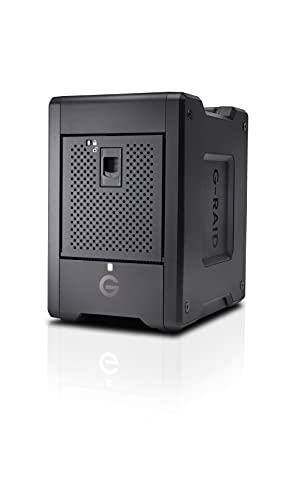
- Best for: Post houses and DIT workflows that need a large, protected, moveable project volume.
- 72TB capacity from four removable Ultrastar enterprise-class 7200 RPM drives
- Built-in hardware RAID, preconfigured RAID 5; supports RAID 0, 1, 10, and JBOD
- Thunderbolt 3 and USB-C (10Gbps) interfaces
- Transfer rates up to 1000MB/s read and 1100MB/s write
Post houses and DIT workflows that need a large, protected, moveable project volume.
It is a substantial investment and a large chassis; confirm the capacity you need, because drives are supplied as a matched set.
The Shuttle 4 is built for production environments where the array travels between the set, the edit bay, and the color suite. It arrives populated with four enterprise-class Ultrastar drives and a hardware RAID controller preconfigured to RAID 5, with dual Thunderbolt 3 ports that also allow daisy-chaining. A carrying handle and transportable chassis suit location work, and the rated transfer speeds support multi-stream 4K and 8K workflows without proxy files for many codecs.
LaCie 2big RAID 16TB
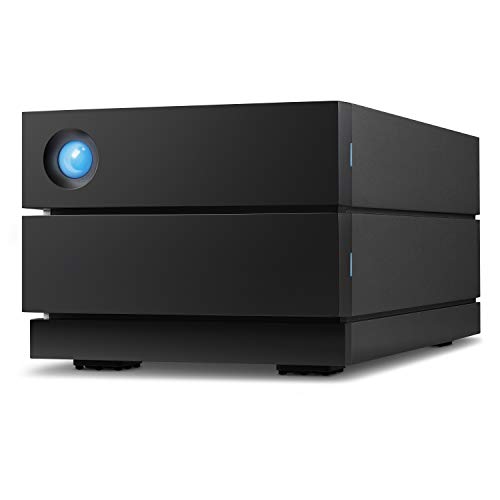
- Best for: Solo editors and small studios wanting a ready-made mirrored or striped desktop volume.
- 16TB capacity from two 7200 RPM enterprise-class drives
- Hardware RAID 0 / 1, set on the enclosure
- USB-C connection with transfer speeds up to 440MB/s
- Hot-swappable drive trays
Solo editors and small studios wanting a ready-made mirrored or striped desktop volume.
With two bays there is no RAID 5 option, and in RAID 1 the usable space is half the headline capacity.
LaCie’s 2big RAID is the simplest route onto hardware RAID for a solo editor: two enterprise-class drives sit inside an aluminum desktop enclosure with a hardware controller offering RAID 0 for speed or RAID 1 for a mirrored working volume. It connects over USB-C, the drives are hot-swappable, and LaCie’s Rescue data recovery services are included for the warranty term. For editors whose active projects fit comfortably in a mirrored pair, it removes nearly all setup decisions.
Oyen Digital Mobius 2C RAID
- Best for: Laptop editors who want a compact mirrored volume for footage and active projects.
- 2 bays for 3.5-inch SATA drives, tool-less trays
- Hardware RAID 0, 1, JBOD, and span (BIG) modes set by switch
- USB-C, USB 3.2 Gen 2, compatible with USB and Thunderbolt 3, 4, and 5 ports
- Internal 60W power supply
Laptop editors who want a compact mirrored volume for footage and active projects.
Two bays limit you to mirroring or striping, and 3.5-inch drives only, so spare 2.5-inch SSDs will not fit.
The Mobius 2C packs hardware RAID into a small two-bay enclosure for editors whose desks or edit carts have no room for a tower. A rear switch selects RAID 0, RAID 1, JBOD, or span modes, the trays are tool-less, and an internal power supply means no external brick cluttering the workstation. It connects over USB-C at USB 3.2 Gen 2 speeds and works with USB and Thunderbolt host ports, making it an easy mirrored ingest or project drive for laptop-based editors.
QNAP TR-002
The TR-002 shrinks QNAP’s hardware RAID approach into a two-bay box with a faster host link than its bigger sibling. It supports RAID 1 mirroring for a protected pair of drives, RAID 0 for a compact scratch disk, and individual or JBOD modes when you just need the bays. Mode selection is by DIP switch or QNAP’s software, and like the TR-004 it can also serve as expansion for a QNAP NAS. For editors who mainly need one safe volume beside a laptop, it covers the essentials.
Specs
- 2 bays for 3.5-inch / 2.5-inch SATA HDDs and SSDs, hot-swappable
- Hardware RAID supporting Individual, JBOD, RAID 0, and RAID 1
- USB 3.2 Gen 2 Type-C host connection (10Gbps)
- RAID set by DIP switch or QNAP External RAID Manager software
- Diskless design; drives sold separately
- Model TR-002-A-US
Best for: Editors who want one mirrored USB-C volume and may later expand a QNAP NAS.
Watch out for: No RAID 5 at this size, and mirroring halves usable capacity, so plan drive sizes accordingly.
ASIN: B0BVCXFMDH
Which One Fits Your Situation
You edit 4K projects alone and want protection without fuss
Choose the LaCie 2big RAID in RAID 1 if your active projects fit on a mirrored pair, since it arrives populated, formatted, and covered by recovery services. If you would rather pick your own drives or expect to outgrow two bays, the QNAP TR-004 in RAID 5 gives more usable space per drive while still tolerating a single failure.
You move footage between set and studio
The G-RAID Shuttle 4 is the pick here. Its transportable chassis, handle, and large preconfigured RAID 5 volume are designed for exactly that hand-off, and Thunderbolt 3 keeps ingest and timeline performance high at both ends of the trip. Back it up at the studio the same day; transportable does not mean indestructible.
You edit on a laptop with a small desk
The Mobius 2C or the QNAP TR-002 both give you a mirrored pair in a compact footprint. The Mobius 2C’s internal power supply keeps cabling tidy, while the TR-002 adds QNAP’s management software and NAS expansion options. Either turns a single risky external drive into a volume that survives a disk failure.
You need a fast scratch volume more than redundancy
Set a QNAP TR-004 or TR-002 to RAID 0 for cache, renders, and proxy media you can regenerate, and keep camera originals on a mirrored or parity volume elsewhere. Striping SSDs in the TR-004 is a cost-effective scratch setup, provided nothing irreplaceable lives there. Many editors run exactly this two-volume split: speed where it is disposable, protection where it is not.
Common Mistakes
- Assuming RAID is a backup: RAID protects against a drive failure, not deletion, theft, or a dead enclosure, so keep a separate backup copy of every project.
- Mixing drive models or sizes inside one array, which forces the controller to the slowest drive’s behavior and can complicate rebuilds.
- Changing the RAID switch or DIP setting after data is written, because reconfiguring the mode on most of these enclosures erases the volume.
- Buying a software RAID or JBOD-only enclosure by mistake when the goal was an array that any computer can read.
- Filling a mirrored two-bay unit with oversized drives but forgetting RAID 1 halves the usable capacity when planning project space.
Frequently Asked Questions
Does hardware RAID work with both Mac and Windows?
Yes. Because the enclosure’s controller presents the array as a single standard USB or Thunderbolt volume, the same box can move between operating systems, subject to the file system you format it with. That portability is a central reason editors choose hardware RAID over an OS-managed software array for shared project drives.
Which RAID level is best for video editing?
For active project storage, RAID 5 on three or four drives balances speed, capacity, and single-drive fault tolerance. RAID 1 suits smaller mirrored volumes, and RAID 0 fits scratch disks holding recreatable media. The right choice depends on whether the volume holds camera originals or files you can render again.
Can I edit 4K footage directly from these enclosures?
Generally yes for single-camera 4K timelines, especially on the Thunderbolt and USB 3.2 Gen 2 models. Multicam 4K, high-frame-rate clips, and uncompressed formats push bandwidth harder, so a striped or parity array on a faster connection, such as the G-RAID Shuttle 4, is the safer choice for demanding timelines.
What happens when a drive fails in one of these enclosures?
In RAID 1, 5, or 10, the array keeps working in a degraded state and rebuilds once you hot-swap in a replacement drive of equal or larger size. Replace the failed drive promptly, because a second failure during the rebuild window can still take the volume down.