Our Short List of 3

- Best for: Players who install many games and want the roomiest drive in this guide.
- Display: 15.6-inch Full HD (1920 x 1080), 144Hz, full sRGB
- Processor: AMD Ryzen 7 7735HS, 8 cores, up to 4.7 GHz boost
- Graphics: NVIDIA GeForce RTX 4050, 6GB GDDR6
- Memory: 16GB DDR5-4800

- Best for: Students and casual players who want one laptop for games, classes, and everyday use.
- Display: 15.6-inch Full HD (1920 x 1080), 144Hz
- Processor: AMD Ryzen 7 8845HS, 8 cores
- Graphics: NVIDIA GeForce RTX 4050, 6GB GDDR6
- Memory: 16GB RAM

- Best for: Family desks and living-room play where a tidy, understated laptop matters.
- Display: 15.6-inch Full HD IPS (1920 x 1080), 144Hz
- Processor: AMD Ryzen 7 7445HS, 6 cores, up to 4.7 GHz boost, 16MB L3 cache
- Graphics: NVIDIA GeForce RTX 4050, 6GB GDDR6
- Memory: 16GB DDR5 RAM
All 5 Picks at a Glance
| Product | Specs | Action |
|---|---|---|
| ASUS TUF Gaming A15 FA507NU-DS74 |
| Check price on Amazon |
| Lenovo LOQ 15 83DX00B2US |
| Check price on Amazon |
| HP Victus 15 |
| Check price on Amazon |
 Acer Nitro V 15 ANV15-51-51H9 |
| Check price on Amazon |
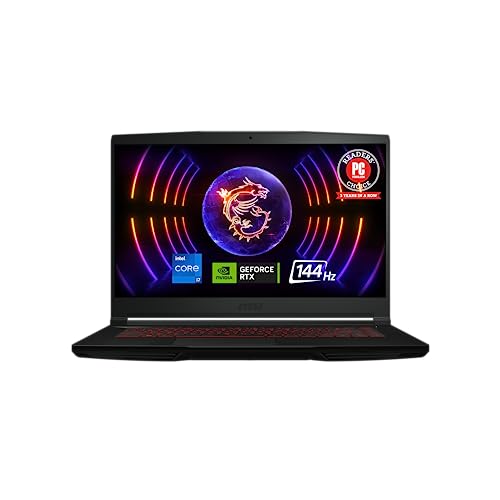 MSI Thin GF63 12VE-066US |
| Check price on Amazon |
Key takeaways
- Find a laptop that runs Goat Simulator smoothly. Compare five RTX 4050 gaming laptops with fast displays, solid cooling, and room for more games.
Goat Simulator looks simple, yet the real buying decision is trickier than the cartoon art suggests. The game throws ragdoll physics, exploding props, and crowded scenes at the hardware all at once, so a laptop that handles a quiet walking game can still stutter when a goat headbutts a petrol station and half the town goes flying. Buyers need a machine with a real dedicated graphics card and enough memory to keep those chaotic moments smooth, without paying for a flagship rig built for far heavier titles.
This guide is for casual players who want Goat Simulator to run cleanly, for students who need one laptop for classes and games, and for parents buying a first gaming laptop for a younger player. Every laptop below was chosen from the names and specifications shown on its Amazon product page, and each one carries a dedicated RTX 4050 graphics card, which gives the whole shortlist a consistent baseline of gaming power.
Quick Picks
As an Amazon Associate we earn from qualifying purchases
| Product | Best for | Key spec from title |
|---|---|---|
| ASUS TUF Gaming A15 FA507NU-DS74 | Long sessions with a big game library | 1TB PCIe SSD with RTX 4050 |
| Lenovo LOQ 15 83DX00B2US | Balanced everyday gaming and study | Ryzen 7 8845HS with RTX 4050 |
| HP Victus 15 | A tidy desk setup with an external screen | Ryzen 7 7445HS with RTX 4050 |
| Acer Nitro V 15 ANV15-51-51H9 | A first gaming laptop on a tighter budget | Core i5-13420H with RTX 4050 |
| MSI Thin GF63 12VE-066US | Carrying a gaming laptop between rooms | Core i7 with RTX 4050 and Cooler Boost 5 |
How to Choose
Start With the Graphics Card
Goat Simulator is not a demanding game on paper, but its physics engine is what separates a smooth session from a choppy one. A dedicated graphics card with its own video memory handles the ragdoll collisions, particle effects, and sudden camera swings far better than shared graphics borrowed from system memory. Every laptop in this guide uses an NVIDIA GeForce RTX 4050 with 6GB of dedicated GDDR6 memory, which is more than the game needs and leaves room for newer entries in the series. When comparing laptops, check that the listing names a dedicated card rather than integrated graphics, and confirm the video memory figure in the title or specification table before buying.
Processor and Memory Decide the Smoothness
The processor manages the physics calculations, the game logic, and everything else running in the background, so a modern multi-core chip matters even for a light-hearted game. The laptops here range from a six-core Ryzen 7 to eight-core Ryzen 7 and Intel Core i5 and i7 chips, all of which clear the bar comfortably. Memory matters just as much: 16GB lets the game, a browser, and a chat app run side by side without slowdowns, while an 8GB machine can feel cramped the moment extra programs open. If a laptop ships with 8GB, check whether the listing mentions upgradeable memory, because adding a second stick later is often the cheapest meaningful upgrade.
Display and Cooling Shape the Experience
A 144Hz Full HD display makes Goat Simulator feel noticeably more responsive than a standard 60Hz panel, because the goat’s licks, flips, and tumbles track the player’s input with less visible lag. All five laptops here pair a 15.6-inch Full HD panel with a 144Hz refresh rate, so the screen is one area where buyers do not need to compromise. Cooling deserves equal attention: a physics-heavy scene pushes the processor and graphics card together, and a laptop with dual fans and well-placed vents holds its speed longer. Listen for how the maker describes its cooling system in the listing, and keep the rear vents clear of bedding and soft surfaces during play.
Storage, Ports, and Room to Grow
Goat Simulator itself takes modest space, but a gaming laptop rarely holds just one game, and storage fills faster than most buyers expect. A 1TB drive suits players who install several large titles alongside the game, while a 512GB drive works when the library stays small or older games are removed regularly. Ports matter too: an HDMI port connects the laptop to a television for couch play, USB-C handles modern docks and fast drives, and a full-size keyboard with a number pad helps with games that use many keys. Before buying, check the listing for the number of storage slots and whether memory can be expanded, since those details decide how long the laptop stays useful.
The 5 Best Options
ASUS TUF Gaming A15 FA507NU-DS74
- Best for: Players who install many games and want the roomiest drive in this guide.
- Display: 15.6-inch Full HD (1920 x 1080), 144Hz, full sRGB
- Processor: AMD Ryzen 7 7735HS, 8 cores, up to 4.7 GHz boost
- Graphics: NVIDIA GeForce RTX 4050, 6GB GDDR6
- Memory: 16GB DDR5-4800
Players who install many games and want the roomiest drive in this guide.
Confirm the exact model number FA507NU-DS74 on the listing, since the TUF A15 family ships in several similar configurations.
The TUF Gaming A15 is the pick for players who want the largest storage in this guide and a screen that shows the game’s bright, cartoon world clearly. Its AMD Ryzen 7 7735HS processor has eight cores and boosts up to 4.7 GHz, while the RTX 4050 graphics card and 16GB of DDR5 memory keep frame rates steady when the physics engine goes wild. The 15.6-inch Full HD display runs at 144Hz with full sRGB coverage, so colours look vivid and motion stays smooth. Wi-Fi 6E keeps online sessions stable, and Windows 11 comes installed.
Lenovo LOQ 15 83DX00B2US
- Best for: Students and casual players who want one laptop for games, classes, and everyday use.
- Display: 15.6-inch Full HD (1920 x 1080), 144Hz
- Processor: AMD Ryzen 7 8845HS, 8 cores
- Graphics: NVIDIA GeForce RTX 4050, 6GB GDDR6
- Memory: 16GB RAM
Students and casual players who want one laptop for games, classes, and everyday use.
The 512GB drive fills quickly with several large games installed, so check how much free space the library will need.
The Lenovo LOQ 15 balances gaming power with the kind of sensible design that works just as well for homework as for headbutting virtual pedestrians. Its AMD Ryzen 7 8845HS processor has eight cores, and the RTX 4050 graphics card with 6GB of memory handles Goat Simulator and far heavier games without strain. The 15.6-inch Full HD display runs at 144Hz, the 16GB of RAM keeps multitasking smooth, and the 512GB SSD loads the game quickly. HDMI and USB-C ports make it easy to connect a second screen or a dock, and Wi-Fi 6 keeps wireless play reliable.
HP Victus 15
- Best for: Family desks and living-room play where a tidy, understated laptop matters.
- Display: 15.6-inch Full HD IPS (1920 x 1080), 144Hz
- Processor: AMD Ryzen 7 7445HS, 6 cores, up to 4.7 GHz boost, 16MB L3 cache
- Graphics: NVIDIA GeForce RTX 4050, 6GB GDDR6
- Memory: 16GB DDR5 RAM
Family desks and living-room play where a tidy, understated laptop matters.
This listing appears to be a seller bundle that includes a hub accessory, so confirm exactly what is included and who the seller is before buying.
The HP Victus 15 is a straightforward gaming laptop that covers every Goat Simulator need without fuss, and its clean silver design fits a shared family desk better than a flashier chassis. Its AMD Ryzen 7 7445HS processor has six cores and boosts up to 4.7 GHz, while the RTX 4050 graphics card with 6GB of memory keeps the game’s ragdoll chaos running smoothly. The 15.6-inch Full HD IPS display runs at 144Hz, the 16GB of DDR5 memory handles multitasking, and the 512GB SSD keeps load times short. A backlit keyboard helps during evening sessions, and DTS:X Ultra audio adds depth to the game’s sound effects.
Acer Nitro V 15 ANV15-51-51H9
- Best for: First-time gaming laptop buyers who want dedicated graphics at the lowest step into this guide.
- Display: 15.6-inch Full HD IPS, 144Hz
- Processor: Intel Core i5-13420H
- Graphics: NVIDIA GeForce RTX 4050 Laptop GPU
- Memory: 8GB DDR5
First-time gaming laptop buyers who want dedicated graphics at the lowest step into this guide.
The 8GB of memory is the smallest in this guide, so check whether the listing supports a memory upgrade before buying.
The Acer Nitro V 15 is the entry point of this guide, built for buyers who want a genuine gaming laptop with a dedicated graphics card and do not need the largest memory or storage figures. Its Intel Core i5-13420H processor pairs with the RTX 4050 graphics card to run Goat Simulator smoothly at Full HD, and the 15.6-inch Full HD IPS display runs at 144Hz for responsive play. The 512GB Gen 4 SSD loads games quickly, Wi-Fi 6 keeps online features stable, and the backlit keyboard is useful in dim rooms. Dual fans and effective exhaust vents manage heat during longer sessions.
MSI Thin GF63 12VE-066US
- Best for: Players who move their laptop between rooms and want a slimmer machine to carry.
- Display: 15.6-inch, 144Hz
- Processor: 12th Gen Intel Core i7
- Graphics: NVIDIA GeForce RTX 4050
- Memory: 16GB DDR4
Players who move their laptop between rooms and want a slimmer machine to carry.
The slim chassis leaves less room for cooling airflow, so use it on a hard, flat surface during long sessions.
The MSI Thin GF63 suits players who carry their laptop around the house or to a friend’s place, because its slim chassis is easier to move than the bulkier gaming laptops in this guide. Its 12th Gen Intel Core i7 processor and RTX 4050 graphics card run Goat Simulator smoothly, while 16GB of DDR4 memory and a 512GB NVMe SSD keep the system responsive. The 15.6-inch display runs at 144Hz, the Type-C port covers modern accessories, and Cooler Boost 5 manages airflow during busy scenes. Windows 11 Home comes installed, so the laptop is ready to play out of the box.
Which One Fits Your Situation
You Want the Biggest Game Library
Pick the ASUS TUF Gaming A15. Its 1TB SSD holds roughly twice as many games as the 512GB drives in the rest of this guide, so Goat Simulator can sit beside several larger titles without constant uninstalling. The 16GB of fast DDR5 memory and the eight-core Ryzen 7 processor also give it the strongest all-round specification here, which helps when the library grows into heavier games.
You Need One Laptop for School and Games
Pick the Lenovo LOQ 15. Its eight-core Ryzen 7 8845HS processor and 16GB of memory handle assignments, video calls, and gaming equally well, and the HDMI and USB-C ports make it easy to connect a monitor at a desk. The understated design looks at home in a classroom or library, while the RTX 4050 graphics card keeps Goat Simulator running smoothly after the work is done.
You Are Buying a First Gaming Laptop
Pick the Acer Nitro V 15. It is the simplest way into dedicated graphics in this guide, with a Core i5 processor and an RTX 4050 that run Goat Simulator cleanly at Full HD. The 144Hz display and backlit keyboard give it a proper gaming feel, and the dual-fan cooling keeps it comfortable during longer play. Just plan for a memory upgrade later if multitasking starts to feel tight.
You Carry Your Laptop Around a Lot
Pick the MSI Thin GF63. Its slim chassis and lighter build make it the easiest laptop here to slip into a bag and move between rooms, and the 16GB of memory means it does not sacrifice everyday responsiveness for portability. The RTX 4050 graphics card and 144Hz display keep Goat Simulator smooth wherever the laptop ends up, from the kitchen table to a friend’s living room.
Common Mistakes
- Buying a laptop with only integrated graphics and assuming any modern machine runs the game smoothly, when the physics-heavy scenes are exactly where shared graphics struggle.
- Choosing 8GB of memory without checking whether it can be upgraded, then wondering why the laptop slows down with a browser and chat app open beside the game.
- Picking the smallest storage drive available and then having to uninstall games every time a new one arrives.
- Ignoring cooling and refresh rate, even though a 144Hz display and working airflow make a bigger difference to how the game feels than a slightly faster processor.
- Ordering a bundle listing without reading what is included, and ending up with extra accessories that were never wanted or a different seller than expected.
Frequently Asked Questions
Can Goat Simulator run on a laptop without a dedicated graphics card?
It can launch on some integrated graphics, but the experience is unreliable once the physics engine starts throwing objects around, and frame rates can drop sharply in busy scenes. A dedicated card such as the RTX 4050 in every laptop here removes that worry, and it leaves room for newer entries in the series and other games. For a machine bought mainly for gaming, dedicated graphics is the safer choice.
How much RAM do I need for Goat Simulator?
The game itself is light, yet 16GB is the sensible target for a gaming laptop because the operating system, a browser, and background apps all share the same memory. An 8GB machine can run the game, but it leaves little room for multitasking and may feel cramped over time. If the budget only stretches to 8GB, choose a laptop whose listing confirms the memory can be upgraded later.
Do I need a more powerful graphics card than the RTX 4050?
For Goat Simulator on its own, the RTX 4050 is already more than enough, and a stronger card would add cost without a visible benefit in this game. The reason to spend more would be heavier titles in the same library, such as large open-world games that demand more video memory. Buyers who only play Goat Simulator and similar light games can stop at the RTX 4050 with confidence.
Will these laptops run newer games in the Goat Simulator series?
Yes, the newer entries use the same playful physics sandbox and modest visual style, so an RTX 4050 with 6GB of memory, a multi-core processor, and 16GB of RAM covers them comfortably at Full HD. The 144Hz displays here help the chaotic moments feel smooth. Check the listed requirements when a new entry launches, but this hardware sits well above what the series has asked for so far.