Key takeaways
- Two verified laptop backpacks with lumbar support, padded straps and airflow back panels, compared for commuters who carry a laptop all day.
Disclosure: As an Amazon Associate, we earn from qualifying purchases.
Our top pick: Targus Drifter II Laptop Backpack (TSB239US). Runner-up: SWISSGEAR 1900 ScanSmart TSA Laptop Backpack.
A laptop backpack carried every day has to do more than hold a computer. A laptop, its charger, a water bottle and the day’s extras add up to a real load, and a basic pack hangs that load from two thin straps and lets it sag away from the spine, so the shoulders and lower back do all the work. A backpack designed with back support in mind attacks the problem differently: padding shaped for the lower back, wide padded straps that spread the weight, a structure that holds the load close to the body, and a back panel that lets air move on a warm commute.
This guide covers laptop backpacks only, and only models with documented back-support features. Each model below was checked against a real Amazon US listing with a verified ASIN. Two models met both tests — a verifiable listing and back-support design described on that listing — so this guide covers those two in depth rather than padding the list with ordinary laptop backpacks whose listings say nothing about back support, or with hiking daypacks, which are a different product built for a different job. Neither listing makes a medical claim, and neither do we: what follows compares design features, not treatments.
The two picks take visibly different approaches to the same problem, which makes the choice between them simpler than a longer list would. One puts its effort into a padded pocket positioned for the lower back and heavily padded straps, and suits the commuter whose journey is mostly walking. The other spreads its support across a padded airflow panel and contoured straps, and adds a lay-flat compartment and extra pockets that suit travel days and mixed journeys. Both carry a 17-inch laptop, both are proper laptop backpacks rather than outdoor packs, and both earn their place here on features their listings actually describe. Read the two sections with your own journey in mind — the distances on foot, the time spent standing on platforms, the heat of the carriage — because the better backpack is the one whose support matches where your day actually loads your back.
Quick Picks
- Targus Drifter II Laptop Backpack (TSB239US) — Best for lumbar support: a padded pocket positioned to support the lower back, heavily padded shoulder straps and a breathable mesh back panel; fits laptops up to 17 inches.
- SWISSGEAR 1900 ScanSmart TSA Laptop Backpack — Best for travel days: a padded airflow back panel, ergonomically contoured padded straps, a lay-flat laptop compartment and an RFID pocket; fits a 17-inch laptop.
Targus Drifter II Laptop Backpack (TSB239US)

OUR TOP PICK
The Drifter II takes the top spot because its back panel is built around the lower back rather than simply padded all over. As stated on the listing, the padded back panel includes a padded pocket positioned to provide lumbar support, so the part of the pack that meets the curve of the lower back is deliberately cushioned instead of flat. For a commuter whose ache settles in the lower back after a long platform wait or a walk at either end of a train ride, that targeted padding is the single most relevant feature in this guide.
The rest of the carry system supports the same aim. The shoulder straps are heavily padded, as stated on the listing, which spreads the load across the shoulders instead of letting narrow webbing dig in. The back panel uses breathable mesh, so the contact area stays ventilated on warmer days, and the base is water-resistant, which matters when the pack is set down on a wet platform or pavement. The body is durable nylon, and the laptop compartment fits machines up to 17 inches, as stated on the listing, which covers the larger work laptops that tend to make a daily load heavy in the first place.
In daily use, the details recorded on the listing hang together well. A 17-inch laptop is rarely a light laptop, and the Drifter II’s compartment is sized for exactly that class of machine, so the heaviest item in the load sits in a defined space against the padded panel rather than sliding around a general compartment. The breathable mesh on that panel earns its keep on the walking legs of the journey, where a solid foam panel can leave a damp patch on a shirt by the time the office door is reached. The water-resistant base sounds minor until the pack spends a rainy season being put down on wet platforms, puddled pavements and the floors of crowded carriages; it is the part of the bag that meets all of that, and here it is built to shrug the water off. The durable nylon body suits the same routine of racks, floors and under-seat spaces.
Choose the Drifter II when the walk matters more than the flight: when most of the journey is on foot, when the lower back is where the strain shows up, and when a 17-inch laptop is part of the daily load. Its support comes from where the padding is placed, not from extra organisational features, and that focus is exactly why it leads this guide.
Specs
– Model: TSB239US
– Laptop fit: up to 17 inches, as stated on the listing
– Back panel: padded, with a padded pocket positioned to provide lumbar support, as stated on the listing
– Shoulder straps: heavily padded, as stated on the listing
– Ventilation: breathable mesh back panel, as stated on the listing
– Base: water-resistant, as stated on the listing
– Material: durable nylon, as stated on the listing
Pros
– Padded pocket positioned for lumbar support — the clearest back-support feature in this guide
– Heavily padded shoulder straps for long carries on foot
– Breathable mesh back panel for warmer commutes
– Water-resistant base for wet platforms and pavements
Cons
– No lay-flat checkpoint compartment is recorded on the listing
– No RFID pocket is recorded on the listing
SWISSGEAR 1900 ScanSmart TSA Laptop Backpack
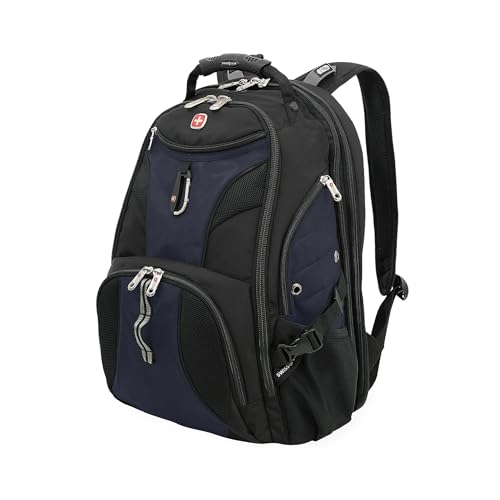
The SWISSGEAR 1900 takes a different route to a comfortable carry. Instead of a dedicated lumbar pocket, its back panel is a padded airflow design, as stated on the listing, built to let air circulate between the pack and the wearer’s back. Its shoulder straps are ergonomically contoured and padded, shaped to follow the shoulder rather than sitting as straight straps, which helps the pack ride close and even on both sides. For a commuter who heats up on crowded trains and walks briskly between connections, that airflow panel is a genuine comfort feature, not a styling detail.
Where the 1900 pulls ahead is travel. The ScanSmart laptop compartment opens lay-flat, as stated on the listing, so the laptop section can be laid open at airport security screening without lifting the machine out of the bag — the product is sold as a TSA laptop backpack for exactly that routine. There is also an RFID pocket for cards and a separate tablet pocket, as stated on the listing, so a second screen travels apart from the laptop. Like the Drifter II, it fits a 17-inch laptop, as stated on the listing.
The two-device routine is where this design makes the most sense. A 17-inch laptop in the lay-flat compartment and a tablet in its own pocket means neither device presses on the other, and both sit flat in the half of the bag nearest the wearer’s back, which is where heavy items belong. On a travel day the sequence at security is calmer, too: the laptop section opens flat on the belt, the machine stays in the bag, and the RFID pocket keeps cards in a defined place while everything else is being moved around. Back at the walking part of the journey, the contoured straps and the airflow panel do the quieter work — the straps keep the pack settled evenly across the shoulders, and the panel keeps air moving behind it on a warm platform. None of this turns the 1900 into a walking-first pack, but it makes a mixed journey feel considered rather than improvised.
Choose the 1900 when the commute includes flights or when organisation matters as much as support: the lay-flat compartment, RFID pocket and tablet pocket make it the better travel companion. If the priority is padding aimed squarely at the lower back on a long daily walk, the Targus above has the edge, because the 1900’s listing describes panel padding and airflow rather than a lumbar support pocket.
Specs
– Model: SWISSGEAR 1900 ScanSmart
– Laptop fit: 17 inches, as stated on the listing
– Back panel: padded airflow design, as stated on the listing
– Shoulder straps: ergonomically contoured and padded, as stated on the listing
– Laptop compartment: lay-flat ScanSmart design, as stated on the listing
– Extra pockets: RFID pocket and tablet pocket, as stated on the listing
Pros
– Padded airflow back panel for warm, crowded commutes
– Ergonomically contoured, padded shoulder straps
– Lay-flat laptop compartment for airport security screening
– RFID pocket and a separate tablet pocket
Cons
– No dedicated lumbar support pocket is recorded on the listing; support comes from panel padding and strap shape
– No water-resistant base is recorded on the listing
How to Choose
Begin with the load, not the bag. Weigh what you actually carry on a normal day — laptop, charger, bottle, book, lunch — because total weight does more to strain a back than any single feature can undo. Both backpacks in this guide fit laptops up to 17 inches, and a 17-inch machine with its power supply is a heavy foundation for a daily load. If the all-in weight is high, the most effective change is often carrying less, and a supportive pack is the second change, not a substitute for the first.
Next, look at the back panel, because that is where the two picks in this guide differ most. One approach is targeted lumbar padding: a cushioned section positioned where the pack meets the curve of the lower back, as on the Drifter II. Padding there fills the gap between the pack and the spine, so the load is shared by the back instead of hanging entirely from the shoulders. The other approach is a padded airflow panel, as on the SWISSGEAR 1900, which spreads contact evenly and adds ventilation. Neither is automatically better; the right choice depends on whether your discomfort is a lower-back ache after standing and walking, or heat and pressure across the whole back on a busy commute.
Shoulder straps come third. Wide, well-padded straps spread pressure over a larger area, and contoured straps follow the shoulder’s shape so the pack sits balanced instead of twisting. Whatever the strap design, adjustment matters as much as padding: tighten the straps so the pack rides high and close to the back. A backpack allowed to sag down toward the hips pulls the shoulders back and shifts strain into the lower back, which defeats the purpose of choosing a supportive model in the first place.
Then check how the laptop is carried. The heaviest item should sit snug against the back panel, not loose in a cavernous main compartment where it swings as you walk. Both models here have a defined laptop compartment for a 17-inch machine; the SWISSGEAR adds a lay-flat design that also speeds up airport screening, plus a tablet pocket that keeps a second device flat against the same panel. Pack heavier items closest to your back and lighter items further out, and the whole load will feel steadier.
Ventilation and the base are the everyday details. A breathable mesh or airflow panel will not change how weight is distributed, but on a warm commute it decides whether the shirt against the panel ends the journey damp. A water-resistant base, as recorded for the Drifter II, protects the contents when the pack is set down on wet ground, and a durable shell fabric stands up to being swung onto luggage racks and under seats twice a day.
Fit deserves a moment of its own, because a supportive backpack worn badly behaves like an unsupportive one. The bottom of the pack should sit at the waist, not below it, and the shoulder straps should be adjusted so the load is drawn in toward the upper back rather than hanging away from it. Fill the pack in the order described above — laptop and tablet against the panel, lighter and softer items outward — and then adjust the straps with the pack loaded, not empty, because the balance changes once the weight is in. If one shoulder consistently takes more strain than the other, the load is probably packed unevenly or one strap is set longer than the other; both are fixable in a minute, and both matter more over a month of commutes than small differences in padding. Neither listing in this guide records a hip belt or a sternum strap, so the carry on both models rests on the shoulder straps and back panel alone — another reason to keep the total load honest and the fit snug.
Finally, keep an honest limit in mind. Back-support features change how a load is carried: where the padding sits, how the straps spread weight, how close the load rides. They are design features, and the listings for both backpacks describe them in those terms. No backpack is a treatment for a back condition, and if pain persists, sharpens, or spreads, the right step is to reduce the load and get the back looked at by a qualified professional — not to keep shopping for a stronger claim on a product page.
FAQs
Can a laptop backpack with lumbar support cure back pain?
No, and neither listing in this guide claims anything of the kind. Features such as the Drifter II’s padded lumbar pocket or the SWISSGEAR 1900’s airflow panel are design features that change how a load is carried — padding where the lower back meets the pack, straps that spread weight, a load held close to the body. Those choices can make a daily carry more comfortable and can reduce the strain that comes from a badly balanced bag, but a backpack is not a medical treatment. Persistent back pain deserves a professional assessment, and lightening the load is always the first step.
How do I check that my laptop will fit these backpacks?
Both listings state fit for laptops up to 17 inches — the Drifter II up to 17 inches, and the SWISSGEAR 1900 for a 17-inch laptop. Check the diagonal screen size of your machine against that figure, and remember that thick gaming laptops can be a tighter squeeze than slim work machines of the same screen size. If your laptop is an unusually bulky 17-inch model, confirm the compartment dimensions on the live listing before ordering, and allow room for the charger, which adds both bulk and weight.
Which backpack should I choose if my commute includes flying?
The SWISSGEAR 1900 is the travel pick: its ScanSmart compartment opens lay-flat for airport security screening, and it adds an RFID pocket and a tablet pocket for organised travel days. Choose the Targus Drifter II instead if the journey is mostly walking — across a city, between stations, or on a campus — and padding aimed at the lower back matters more than checkpoint convenience. Both carry a 17-inch laptop, so the decision rests on the journey, not the machine.
Conclusion
For most commuters carrying a laptop every day, the Targus Drifter II is the top pick: its padded pocket positioned for lumbar support is the most direct back-support feature in this guide, backed up by heavily padded straps, a breathable mesh panel and a water-resistant base. The SWISSGEAR 1900 ScanSmart is the runner-up and the better travel companion, with an airflow back panel, contoured straps and a lay-flat compartment for airport screening. Before buying, weigh your daily load honestly, check your laptop’s size against the 17-inch fit both listings state, and confirm the details on the live listing.